
Buyer’s guide · Desktop security
Avast Premium Security: what the licence covers, and what it does not
Advertising disclosure — read this first
This guide is free to read because it carries partner links. If you subscribe to Avast after following one of them, Durimenko s.r.o. receives a commission from the advertising network that operates the link. You pay exactly the same price as you would by going to Avast directly — nothing is added, and no discount is removed.
Being paid on a sale creates an obvious incentive to be flattering. Our answer to that is to publish
the unflattering parts too: this guide opens by correcting three claims about this product that appear
on a great many review pages, including the earlier version of this one. Every commercial link on this
site is labelled “partner link” and carries rel="sponsored nofollow". Our
editorial policy sets out what we will and will not do for money.
Avast Premium Security is the paid desktop tier of one of the oldest names in antivirus. It is a reasonable product. It is also persistently misdescribed online — usually by pages that list a VPN and a password manager among its features. Neither is included. Here is what a licence actually buys, what it does not, and the six things worth checking before you pay.
The short version
- Premium Security is a protection suite: shields, firewall, ransomware defence, webcam and document protection, sandbox, shredder.
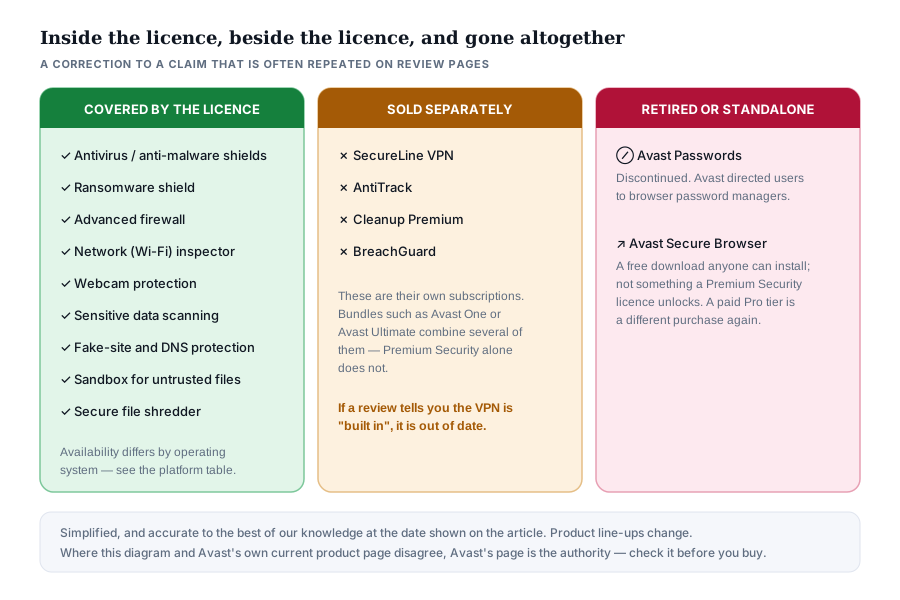
- It does not include SecureLine VPN, AntiTrack, Cleanup Premium or BreachGuard. Those are separate subscriptions. Avast’s bundles — Avast One, Avast Ultimate — are where several are combined.
- Avast no longer offers a password manager. The Avast Passwords product was retired.
- The Windows build is much richer than the macOS build; the mobile apps are different applications again.
- Whatever you choose, an offline or versioned backup does more for you against ransomware than any single feature in any suite.
What we corrected in this guide
An earlier version of this page repeated the standard marketing summary of Avast Premium Security. Checking it against Avast’s own current product pages showed that several points were wrong. We have rewritten them rather than quietly deleting them, because a reader who has seen the same claims on a dozen other sites deserves to know why this one differs.
Three claims we removed
- “A VPN is built in.” It is not. Avast SecureLine VPN is a separate subscription. It appears in the Avast One and Avast Ultimate bundles, not in a plain Premium Security licence. This is the single most common error about this product.
- “A password manager is included.” It is not, and it cannot be: Avast retired the Avast Passwords product and directed users towards browser-based password managers instead.
- “A secure browser is part of the package.” Avast Secure Browser is a free download that anyone can install without any Avast subscription. A paid Pro tier exists, but it is a separate purchase; it is not unlocked by a Premium Security licence.
We also removed a headline discount percentage, an unsourced statement about the average cost of a data breach, and a “reader story” framing that implied the page contained first-hand testimony. It did not. Nothing on this site is presented as a reader review, and we publish no star ratings of our own.
If any statement here and Avast’s own current documentation disagree, Avast’s information prevails. Product line-ups, plan names and regional availability change without notice, and a vendor is the authority on its own product. Please check the feature list on the Avast page before you pay for anything on the strength of this guide.
This is a partner link. Durimenko s.r.o. is paid a commission if you subscribe after following it; your price is exactly the same either way and nothing is added for you. Avast’s own page is the authority on features, pricing and availability in your country.
What an Avast Premium Security licence actually covers
Avast began in Prague in 1988, under the name ALWIL Software, which makes it one of the oldest continuously operating antivirus businesses in the world. Today it is part of Gen Digital, the company formed when Avast merged with NortonLifeLock in 2022, and which also owns Norton, AVG, Avira and CCleaner. Premium Security is its paid consumer desktop tier, sitting above the free Avast Antivirus and below the bundled Avast One and Avast Ultimate packages.
The clearest way to understand what you are buying is to separate three categories: what the licence covers, what Avast sells alongside it, and what no longer exists.
The protection features, in plain language
- The shields. A file shield checks files as they are opened or written, a web shield inspects downloads and pages, a mail shield inspects attachments. These run constantly and account for most of what the product does day to day.
- Behaviour monitoring. Rather than asking “have I seen this file before?”, this asks “is this program acting like malware?” — injecting itself into other processes, adding startup entries, encrypting documents in bulk. It is how brand-new threats get caught.
- Ransomware shield. A rule that stops applications you have not approved from modifying files in your documents and pictures folders. Microsoft ships a comparable feature in Windows called Controlled Folder Access, but it is switched off by default; Avast’s equivalent is on.
- Advanced firewall. Windows has a capable built-in firewall. Avast’s replaces it with one that exposes per-application rules more readily and changes profile according to the network you are on.
- Network inspector. Scans the devices on your local network and flags weak router settings, default passwords and open services.
- Webcam protection. Requires an application to ask before it can open the camera.
- Sensitive data scanning. Searches your drive for documents that appear to contain identity or financial data, so you can decide where they should really live.
- Sandbox. Runs a program you are unsure about in an isolated environment where it cannot reach the rest of the system.
- Secure file shredder. Overwrites a file rather than only removing its directory entry. On spinning hard disks this is meaningful; on modern solid-state drives with wear levelling and TRIM, overwriting a single file is far less reliable than encrypting the whole drive, which is worth knowing before you rely on it.
The honest summary
Premium Security is a competent, conventional protection suite with a good firewall and a sensible ransomware rule. It is not a privacy bundle, and it will not do the job of a VPN, a password manager or a backup. If those are what you are shopping for, you want different products — possibly from a different vendor.
How the protection is layered
Security suites are marketed as lists of features, which makes them sound like a pile of unrelated tools. They are better understood as a series of gates. A threat has to pass every one of them, and each gate exists because the gate outside it is imperfect.
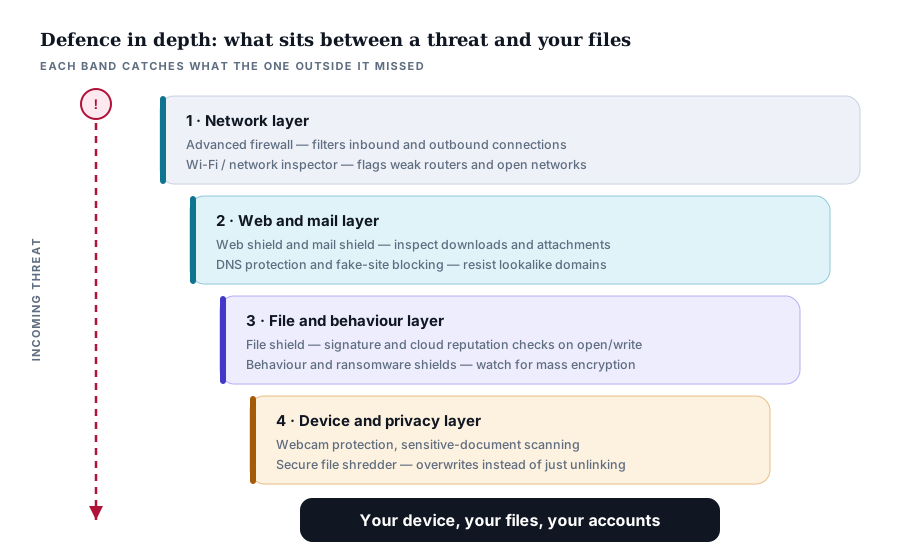
The practical consequence is that the layers are not equally valuable. The file and behaviour layer does the overwhelming majority of the work. The network layer matters most on shared or public networks. The privacy layer is the most situational — a webcam shield is valuable if you have a webcam and worthless if you do not.
How infections actually arrive on a home computer
The mental image most people carry — a virus that arrives on its own, from nowhere — is a poor fit for how compromises actually happen now. In the overwhelming majority of consumer cases something on the machine was run, and a person was persuaded to run it.
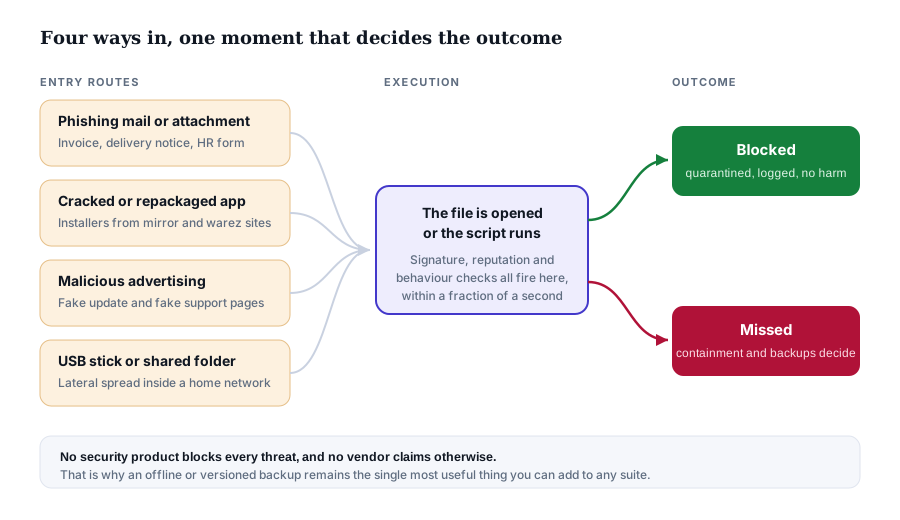
This shapes what protection is worth. A product that is excellent at scanning archives but poor at recognising a lookalike login page is defending the wrong door. It is also why the least glamorous habits — not installing cracked software, treating unexpected attachments as hostile, keeping the operating system and browser updated — still outperform any single product feature.
A note on scale
You will often see a striking figure for the average cost of a data breach. Those numbers come from a small number of annual studies — principally IBM’s Cost of a Data Breach Report — which survey organisations, not households, and whose methodology and figure change every year. We have deliberately not printed a number here. If you want one, read the current edition directly; a figure quoted second-hand on a review page is worth very little.
This is a partner link. Durimenko s.r.o. is paid a commission if you subscribe after following it; your price is exactly the same either way and nothing is added for you.
Ransomware: where a suite helps, and where only a backup does
Ransomware deserves separate treatment because it is the one category where the difference between catching something early and catching it late is the difference between an inconvenience and losing years of files.
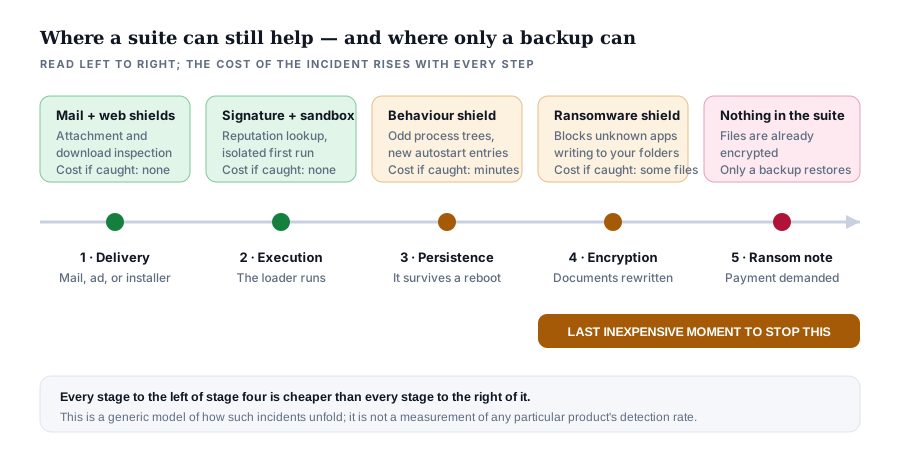
Note where the diagram ends. Once encryption has completed, no feature of any security suite gets your files back. Only a copy that the ransomware could not reach does that — an external drive that is normally unplugged, or a cloud service with genuine version history and a recycle bin that survives deletion.
If you do one thing after reading this
Set up a backup, whether or not you buy anything. An external drive you connect once a week and then disconnect costs less than a year of any security subscription and protects you against the failure mode — total loss of your files — that a subscription cannot fix once it has happened. A suite reduces the chance of the incident; a backup removes its consequences.
Coverage by platform: the same licence, four different products
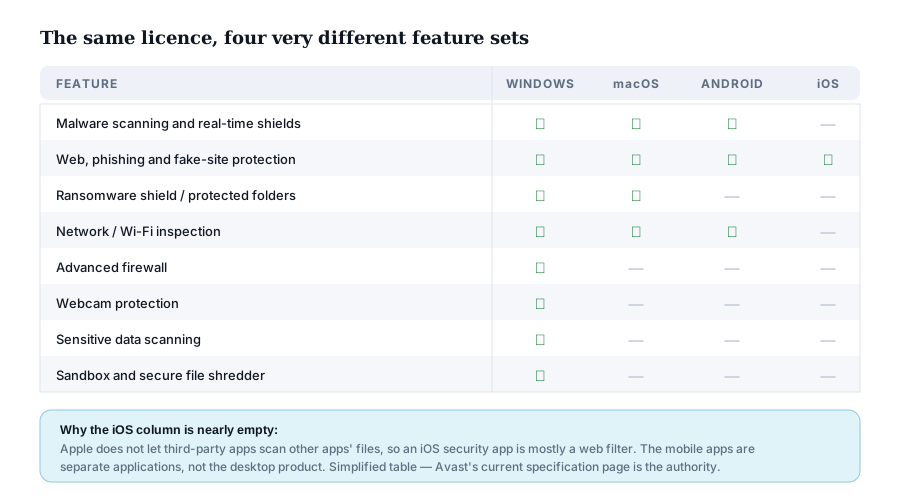
A multi-device licence is often presented as though the same protection travels to every machine. It does not. The Windows build is the complete product; the macOS build is smaller; the Android app is a different application with a different feature set; and on iOS, Apple’s own restrictions mean that no third-party security app can scan other apps at all.
| If your main machine is… | What you actually get | What to check first |
|---|---|---|
| Windows | The complete suite — every feature described in this guide. | The renewal price, and whether you want Avast’s firewall replacing the Windows one. |
| macOS | Shields, web protection, ransomware protection and network inspection. No firewall replacement, no sandbox, no shredder. | Whether the reduced feature set still justifies the same subscription price. |
| Android | A separate app: malware scanning, web protection, network scanning. | Google Play Protect is already present and free; decide what the app adds for you. |
| iPhone / iPad | Essentially a web and phishing filter. Apple does not permit more. | Whether you need it at all — for many people the honest answer is no. |
Is a paid suite worth it when Windows already includes Defender?
This is the question that matters most, and it is the one review pages most often skip. Microsoft Defender is built into Windows, costs nothing, updates through Windows Update, and in independent laboratory testing has for several years scored in the same broad band as the commercial products rather than well below them. Any guide that does not tell you this is not being straight with you.
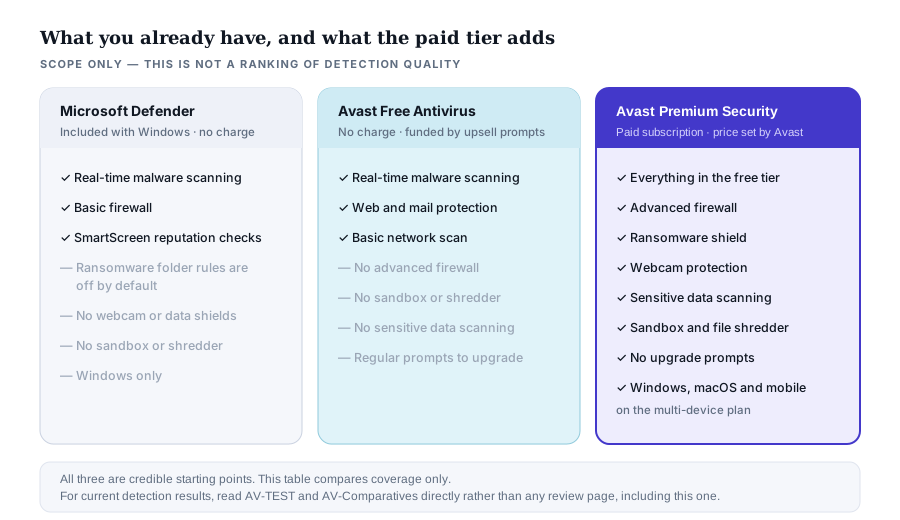
So what does the paid tier genuinely add? Three things worth paying for, depending on who you are:
- Coverage of non-Windows devices from one purchase. Defender does not exist on macOS or Android in a consumer form. If you are securing a household of mixed devices, a multi-device subscription is a real convenience.
- Features Windows either lacks or hides. Sensitive data scanning, the sandbox, the shredder and webcam gating have no straightforward Windows equivalent, and Controlled Folder Access is off by default and awkward enough that most people never enable it.
- Removal of the upsell prompts. If you are already running Avast Free, a large part of what the paid tier buys is silence. That is a legitimate reason to pay, and vendors are rarely willing to say so out loud.
And the honest case against: if you use a single, up-to-date Windows machine, browse carefully, avoid pirated software and already have backups, Defender plus good habits is a defensible choice, and you should not be made to feel reckless for making it.
This is a partner link. Durimenko s.r.o. is paid a commission if you subscribe after following it; your price is exactly the same either way and nothing is added for you. We deliberately quote no price or discount percentage: both change frequently and by country, and only Avast’s checkout is authoritative.
Plans, renewal, refunds and your rights as an EU consumer
Premium Security is sold in single-device and multi-device forms, with the multi-device plan covering a number of machines that Avast states on its own store page. We do not reproduce the device count, the price or any discount here, because all three vary by country and by the day, and a stale figure on a review page is worse than no figure.
The renewal price is the real price
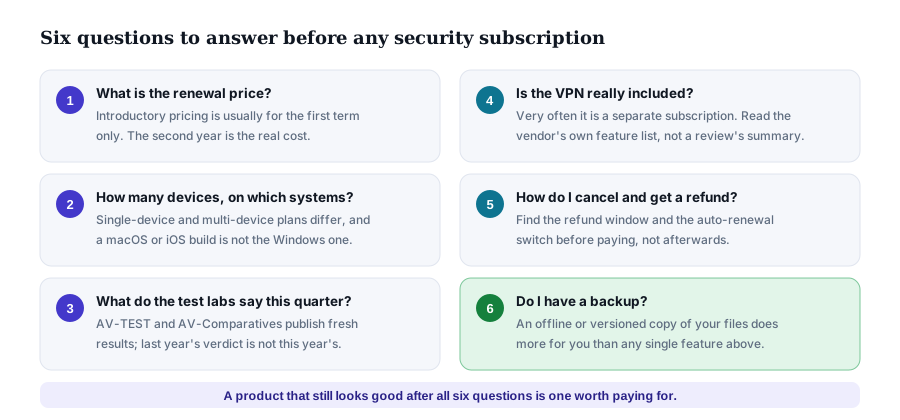
As with nearly every consumer security subscription, the advertised price is usually an introductory rate for the first term. The subscription then renews automatically at the standard rate, which is frequently a good deal higher. Before subscribing, find the renewal price — it is normally in the terms beside the checkout button — and decide whether the product is worth that.
Cancelling and getting a refund
- Automatic renewal can be switched off in your Avast account. Doing it immediately after purchase is a reasonable habit; the subscription still runs its full paid term.
- Avast’s own money-back guarantee applies to purchases made directly from Avast, within a window and under conditions that Avast states at the point of sale. Read that statement at checkout: it is the term that actually binds, not any summary of it elsewhere.
- Your statutory right of withdrawal. Under EU consumer law you generally have fourteen days to withdraw from a distance contract. For digital content and services there is an important exception: if you expressly ask for the service to start immediately and acknowledge that you therefore lose the right of withdrawal, you can lose it. Ticking that box at checkout is normally what starts the download — so read it rather than clicking through.
- Where you bought it matters. A licence bought through a reseller or an app store is governed by that seller’s refund policy, not Avast’s.
Availability
The partner offer linked from this page is not available in every country, and the destination page may differ or may not open depending on where you are. That is a limitation of the advertising programme, not of the product. If the link does not work for you, going to Avast’s own site directly gets you the same product at the same price — we simply are not paid for it.
Avast’s privacy record, stated plainly
A page paid on commission has an obvious reason to omit this section. We are including it because leaving it out would make everything else here less trustworthy.
In January 2020, following reporting by Motherboard and PCMag, Avast announced it was winding down Jumpshot, a subsidiary that had been packaging and selling browsing data derived from Avast users. In February 2024 the United States Federal Trade Commission announced an order against Avast concerning that conduct, including a monetary payment of 16.5 million US dollars and a prohibition on selling or licensing browsing data for advertising purposes. These are matters of public record; the FTC’s own announcement is the source to read, and it is linked in the sources below.
How much weight to give this is a judgement, not a fact, so we will give ours and let you disagree with it. The conduct was serious and the company’s explanations at the time were unconvincing. It also happened several years ago, was ended, and was followed by a binding regulatory order that constrains the specific behaviour. Some readers will reasonably decide that is enough. Others will reasonably decide they would rather give their money to a vendor without that history. Both positions are defensible, and a review page that pretends the question does not exist is not helping you make either choice.
Worth knowing either way
Security software necessarily sees everything you run and, in the case of web shields, much of what you browse. That is true of every vendor in this category, free and paid alike, including the one built into your operating system. The question is never whether a product can see a lot; it is how much you trust what the vendor does with what it sees, and what a regulator can do about it if the answer turns out to be wrong.
How to judge detection quality for yourself
We do not run malware laboratories, so we publish no detection scores. Two independent European institutes do this properly and publish their results openly:
- AV-TEST (Magdeburg, Germany) publishes bi-monthly consumer results scored on protection, performance and usability — the last of which is essentially a false-positive count.
- AV-Comparatives (Innsbruck, Austria) publishes real-world protection tests, malware protection tests, performance tests and false-alarm tests through the year.
Two habits make those reports far more useful. First, read the current one: a product’s standing genuinely moves between rounds, and a verdict from two years ago tells you very little. Second, read the false-positive column, which most summaries ignore. A product that blocks slightly less malware but almost never quarantines your own files is often the better product to live with, and that trade-off is exactly what these tests expose.
Be sceptical of any page — including this one — that hands you a single number out of ten, or a “winner”. We publish no score for this product and no star rating, because we have not conducted the testing that would justify one.
Who it suits, and who it does not
| Likely a good fit | Probably not worth it |
|---|---|
| A household with several Windows machines and mixed devices, wanting one subscription and one interface. | A single, current Windows PC used carefully, with backups already in place — Defender is a defensible choice. |
| Someone who wants the firewall, sandbox, shredder and sensitive-document scan without assembling them from separate tools. | Anyone whose actual goal is a VPN or a password manager: this licence contains neither. |
| An existing Avast Free user who is tired of upgrade prompts and would rather pay for quiet. | Mac-only households, who get a noticeably smaller feature set for the same money. |
| A non-technical user who wants clear status indications and few decisions to make. | Businesses with compliance obligations, which need centrally managed endpoint products rather than a consumer suite. |
Note the second row in particular. If your reason for shopping is “I want a VPN too”, Premium Security is the wrong purchase and you should be looking at Avast One, Avast Ultimate, or a dedicated VPN from another vendor entirely. We would rather tell you that than take a commission on a product that will not do what you wanted.
A buyer’s checklist for any security subscription
None of this is specific to Avast. It applies to every consumer security product sold on a subscription, and it is the list we would want a friend to work through before paying.
This is a partner link. Durimenko s.r.o. is paid a commission if you subscribe after following it; your price is exactly the same either way and nothing is added for you.
Questions and answers
Does Avast Premium Security include a VPN?
No. Avast SecureLine VPN is a separate subscription. It is included in the Avast One and Avast Ultimate bundles. If a review tells you the VPN is built into Premium Security, that review is out of date.
Does it include a password manager?
No. Avast retired its Passwords product and pointed users towards password managers built into browsers. If you want a dedicated password manager, buy one; it is not part of this licence.
Can I run it alongside Microsoft Defender?
You should not run two real-time scanners at once, and in practice you will not have to: when a recognised third-party antivirus registers itself with Windows, Defender’s real-time protection stands down automatically. Defender remains available for periodic scans.
Will it slow my computer down?
Every real-time scanner costs some performance; how much is exactly what the performance sections of the AV-TEST and AV-Comparatives reports measure. Read the current figures rather than any claim on a review page, this one included. On an older machine with a mechanical hard disk the difference is more noticeable than on a modern SSD.
Is it worth installing on an iPhone?
For most people, no. Apple does not allow third-party apps to scan other apps, so an iOS security app is effectively a web and phishing filter. Safari’s own fraudulent-website warning already provides a version of that at no cost.
Given the Jumpshot case, should I trust Avast?
That is a judgement for you to make rather than one we should make for you. The facts are set out in the privacy record section above, with the FTC’s own announcement linked in the sources. The conduct ended in 2020 and is now covered by a binding order; whether that is sufficient is reasonably contested.
Does buying through your link cost me more?
No. The price is set by Avast and is the same whether you arrive through our partner link or type the address yourself. The commission is paid by the advertising network out of its own arrangement with the vendor. If you would rather not have us paid, go to Avast directly — the product and the price are identical.
Do you accept payment to change what this page says?
No. We are paid a commission on sales, and that is the only money that reaches us from this page. No advertiser has any right of review over this text, and no advertiser has seen it before publication. See the editorial policy.
How this page is funded
We think readers are owed a mechanical explanation rather than a one-line disclaimer, so here is the whole chain.
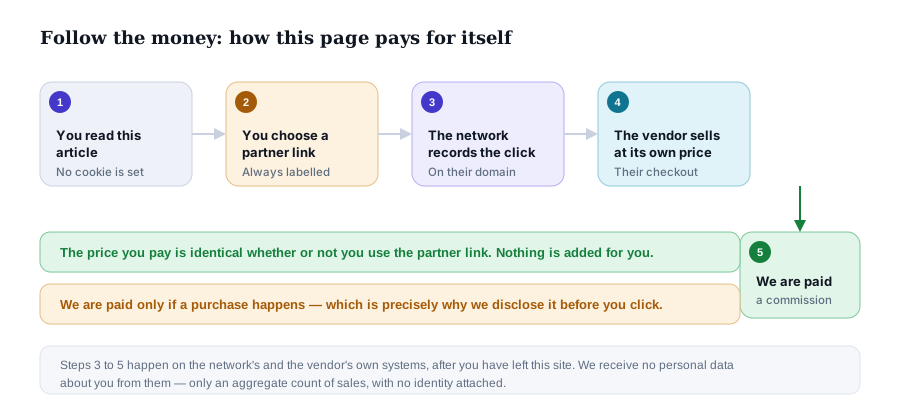
Three consequences follow, and we would rather state them than have you infer them:
- We are paid only if you buy. That is a real incentive to be positive, and it is why this page opens with corrections rather than with praise.
- We are paid the same whether the product suits you or not. Our defence against that is the who it does not suit section, which we would have no commercial reason to write.
- We cannot see whether you bought anything. This site sets no cookie and runs no tracker. The advertising network attributes sales on its own systems, and reports to us as a number, not as people.
Nothing is stored on your device
No cookies, no analytics, no advertising pixel, no fingerprinting, no localStorage and
no sessionStorage. Nothing on this page is loaded from any other domain — no web
fonts, no content delivery network, no remote images. That is why you have not been shown a consent
banner: there is nothing to consent to. The cookie policy explains how to
confirm all of this yourself in your browser’s developer tools, in under a minute.
Sources and method
This guide was written by Paul Murphy and is based on Avast’s published product and support documentation, the published results of the two independent testing institutes named below, and the public record of the Jumpshot matter. No claim here is based on a press release alone, and no statistic has been reprinted that we could not trace to a named source. Where we could not verify something — current prices, current device limits, current detection rates — we have said so and pointed you at the authority rather than guessing.
- Avast — Premium Security product and support pages avast.com and support.avast.com. The authority on features, plan composition, system requirements, pricing and refund terms.
- AV-TEST Institute av-test.org — bi-monthly consumer protection, performance and usability results.
- AV-Comparatives av-comparatives.org — real-world protection, malware protection, performance and false-alarm tests.
- US Federal Trade Commission ftc.gov — the 2024 announcement and order concerning Avast and the sale of browsing data.
- IBM, Cost of a Data Breach Report — named here as the source readers should consult directly for breach-cost figures, rather than as a figure we have reprinted.
- ENISA Threat Landscape enisa.europa.eu — the European Union Agency for Cybersecurity’s annual survey of threat trends.
Precedence, corrections and independence
Precedence. Where anything in this guide diverges from Avast’s own current information, Avast’s information prevails. We are an independent publisher and cannot speak for the vendor.
Corrections. If you find an error, write to info@slavira.online. Substantive corrections are made to the text and noted at the foot of the page with the date, rather than made silently. See the editorial policy for the full procedure.
Independence. No advertiser reviewed, approved or saw this text before publication, and no payment has been accepted to alter it.
Illustrations. All eight diagrams on this page were drawn specifically for this article as original SVG files. No vendor artwork, product screenshot or stock photograph is used anywhere on this site.
Corrections log
- 18 September 2026 — article substantially rewritten. Removed the claims that a VPN, a password manager and a secure browser are included in a Premium Security licence; removed a headline discount percentage; removed an unsourced data-breach cost statement; removed a “reader story” framing that implied first-hand testimony the page did not contain.
Published 18 September 2026 by Paul Murphy, director of publication, Durimenko s.r.o.. Last reviewed 18 September 2026.